
Built a website with AI? Check these risks before launch
Your first website is ready, the copy sounds convincing and the design looks professional. But does everything your business needs actually work? These checks help identify what is still missing before publication.
IDEA Redaktion · Published: 15 October 2026 · Sources checked: 15 October 2026

AI can help build a website: structuring, writing and developing initial drafts. How much work it handles depends on the tool and project. A convincing preview says little, however, about whether enquiries arrive, information is accurate and the website can be maintained over time.
The following risks also exist in conventionally created websites. They deserve particular attention in a quick AI draft if professional review has not yet taken place.
1. Convincing copy can contain incorrect information
AI-generated text may mention services, qualifications or experience your business does not offer or cannot substantiate. Even plausible-looking sources need checking. Google explicitly recommends checking automatically created content for accuracy and reliability before publication. This also applies to page titles, descriptions and image text. Source: Google Search Central.
Your check: Compare every specific claim with your actual services. Check prices, contact people, opening hours and contact details. Remove invented testimonials, awards and references. Have specialist statements reviewed by someone qualified to assess them.
2. A visible form is not yet a working contact channel
A simplified example: A website displays ‘Thank you’ after submission, but the message never reaches the intended inbox. Everything looks complete to the visitor, while the business has no enquiry. This illustrates a possible fault, not a documented client case.
Your check: Send a clearly labelled test enquiry and check its actual receipt. Also test missing required details and invalid entries: are the messages understandable, and do previously entered texts remain? Check phone numbers, email links, appointment bookings and any orders through to their intended destination. Coordinate tests with recipients; for payments, use a designated test mode.
3. Mobile or keyboard use can reveal barriers
A spacious desktop layout can become unreadable on a small screen. Menus, forms and buttons also need to work without relying exclusively on a mouse.
Your check: Open the website on a smartphone, tablet and computer. Enlarge the text. Use the Tab key to move through key functions: is the currently selected element visible? Are fields labelled and error messages clear? The W3C accessibility quick check offers a starting point. It explicitly notes that such quick checks do not replace a full assessment.
For more on the legal scope, read our article Accessible websites: what businesses should check.
4. Privacy text must match the actual technology
Prewritten text does not reveal which services a website actually loads. Analytics tools and embedded content deserve particular scrutiny. Cookies that are not technically necessary generally require consent; technically necessary cookies must be distinguished from these. A visible banner alone does not prove suitable implementation. Source: Hesse Commissioner for Data Protection.
Your check: List the services used and have someone assess which data is transferred where, which legal bases are required and whether functions requiring consent remain blocked until consent is given. Test rejection and later withdrawal. Compare the legal notice and privacy information with actual operation. Uncertain legal cases require qualified assessment.
5. Working code can still contain security vulnerabilities
You cannot tell from appearance whether unauthorised people can access protected data. The OWASP Top 10 describe risks including broken access controls, insecure configurations and processing malicious input. These risks affect web applications regardless of who wrote their code. Source: OWASP Top 10.
Your check: Clarify with a technically responsible person how accounts, permissions, input and extensions are secured. Document updates, backups and a tested recovery process. Customer accounts, uploads, payments or sensitive data require a correspondingly more thorough technical assessment.
6. ‘SEO-optimised’ is not proof of discoverability
Check whether important pages are accessible and clearly linked, and whether the public website is accidentally still blocked from indexing. Google describes these foundations in its SEO Starter Guide. This does not guarantee indexing or a particular position.
Usefulness matters for AI content too. Large numbers of automatically generated pages without added value can violate Google’s spam policies. Source: Google on generative AI content.
Your check: Does every service page answer specific customer questions? Does it contain verifiable information about your offer? Do the pages have suitable titles and descriptions? Add real examples from your business rather than repeating the same generic statements for numerous locations.
From AI draft to checked website
The following process is our practical recommendation for preparing a launch. The scope and depth of checks depend on your website’s features and risks.
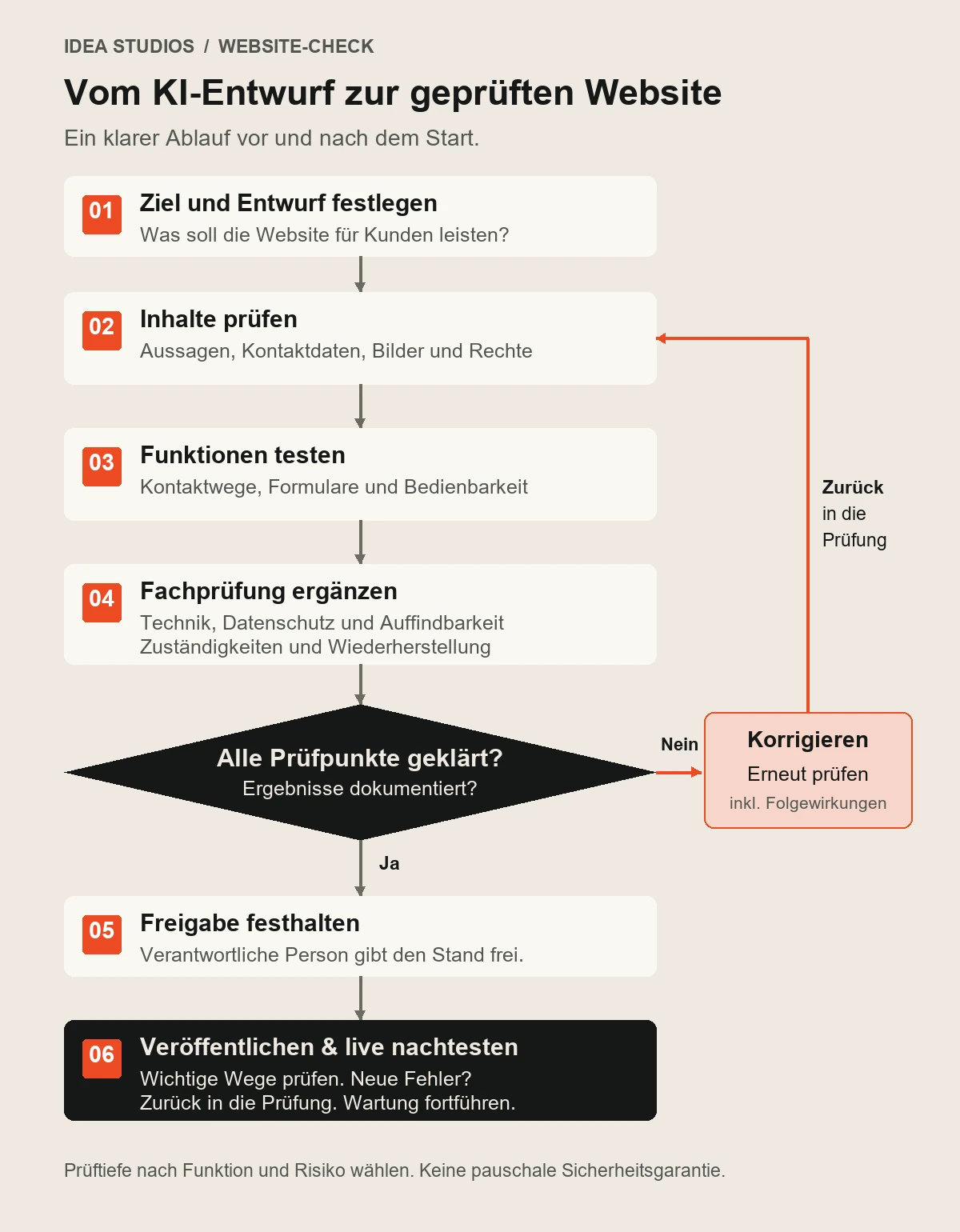
Read the process as text
- Create an AI draft and define the website’s goal.
- Check content and images; clarify sources and usage rights.
- Test contact channels, forms and usability on different devices.
- Have technology, privacy and discoverability professionally reviewed; clarify responsibilities and recovery.
- Are any points still open? Correct errors and recheck affected functions and their connections. Do not approve while issues remain unresolved.
- Document the checked version and obtain approval from the responsible person.
- Publish and retest key journeys live. New errors return to review; then continue maintenance and regular checks.
What you can check yourself – and when support makes sense
You can assess your own services, contact details and customer journeys well. Review the website as someone unfamiliar with your business would. Ask a second person to complete a specific task without explanation, such as finding a service and making an enquiry.
Security configurations, complex data flows and legal questions require suitable expertise. Another AI check may offer clues but does not replace a verifiable assessment. For each open point, record what does not work, who will handle it and how the correction will be checked.
This turns a quick draft into a website whose content, functions and support you can approve knowingly.
What lies behind a website: the technical structure
A website consists of more than visible pages. Using a self-hosted WordPress website as an example, we show how the components work together. With a website builder, the provider often handles several of them. WordPress is therefore one possible foundation, not a requirement for every website.
How your website reaches visitors
The address points to the right server.
Server, storage, PHP, database and encrypted connection.
Manage content, build the design and add features.
Pages, images and forms; a shop or booking system if needed.
Simplified overview by IDEA Studios GmbH. Email sending, payment services or booking systems may also be connected. The arrows show how components relate, not a complete technical network flow.
Address, hosting and software
Domain and DNS: The domain is your internet address. DNS maps the name to the responsible server. Document where the domain is managed, who has access and how renewal is ensured. Source: Cloudflare: DNS explained.
Web host: The host provides the technical environment. WordPress requires, among other things, a suitable PHP environment, a database and HTTPS support. Clarify storage, performance, support and the exact maintenance scope. A hosting contract does not automatically mean someone maintains every WordPress extension. Source: WordPress: hosting requirements.
WordPress, theme and plugins: WordPress manages content and settings. The theme determines key parts of the presentation; plugins add features such as forms or a shop. A website includes both files – such as images and extensions – and the database. Record the components, licences and responsibilities involved.
Security and recovery
Protection: HTTPS encrypts the connection but does not automatically secure the entire website. Security also involves maintained software, individual accounts with suitable permissions, strong passwords and, where possible, an additional sign-in verification step. Security solutions must fit the website and be monitored. Source: WordPress: security basics.
Backups: Back up files and the database together regularly. Keep several versions and a separate copy outside the website server. Define how much data loss would be acceptable in an emergency: a shop usually needs more frequent backups than a rarely updated information site. Do not just check the success message; test recovery too. Clarify retention periods, access and possible restoration costs with the host. Source: WordPress: complete backups.
What ongoing operation needs
- Updates: A responsible person, regular checks, a backup before changes and a functional test afterwards. Test larger changes in a separate test environment first.
- Forms and email: Configure the sending route and destination inbox; verify real test messages through to receipt. A browser success message does not prove receipt.
- Monitoring and emergency plan: Monitor availability, errors, certificates and backup runs. Define who is notified during outages and who handles recovery.
- Contracts and content: Renew domains, hosting and required licences on time. Keep contacts, access, privacy information and consent functions current and aligned with the actual offer.
Your check: Can you name the provider, access route, responsible person and emergency procedure for every component? Only once this is clear does a finished draft become a maintainable system. This operational checklist is a practical recommendation from IDEA Studios GmbH; special features may require further measures.
Sources current as of 15 October 2026. Linked primary sources support the statements assigned to them. Examples, checklists and the process are editorial recommendations by IDEA Studios GmbH. This article provides general guidance and does not replace individual legal advice or a full security and accessibility assessment.